Ship the Scene: Remotion × Claude
A marketing video for Spokenword. Built in code, shipped for social.
1080 × 1920 · 9:16 · 30 fps · 600 frames · 20 seconds
Programmatic animation is having a moment.
Remotion lets developers make video. Not drag-clips-onto-a-timeline video. Write-React-components video. After Effects could never do that. Pair it with Claude and the whole process changes: describe what a scene should do, work through the spring physics in conversation, and have a production-ready MP4 in a few hours. That's not a workflow improvement. It's a paradigm shift.
My first draft proved one thing the hard way. Sadder music. AI-generated applause courtesy of AudioLDM. My considerably cooler kids gave it an immediate thumbs down. This version is closer to their vibe. Humans will always need to be in the loop. Even for the vibe check.
Why Code?
Most marketing videos are assembled on a timeline. This one is a React app. Every frame is driven by code. The same codebase that runs the animation in Remotion Studio renders the final MP4.
That matters. The animation is in git. If the app screenshot changes, one prop changes and the video re-renders. No re-export, no round trip to a designer. That's the bet.
What is Remotion?
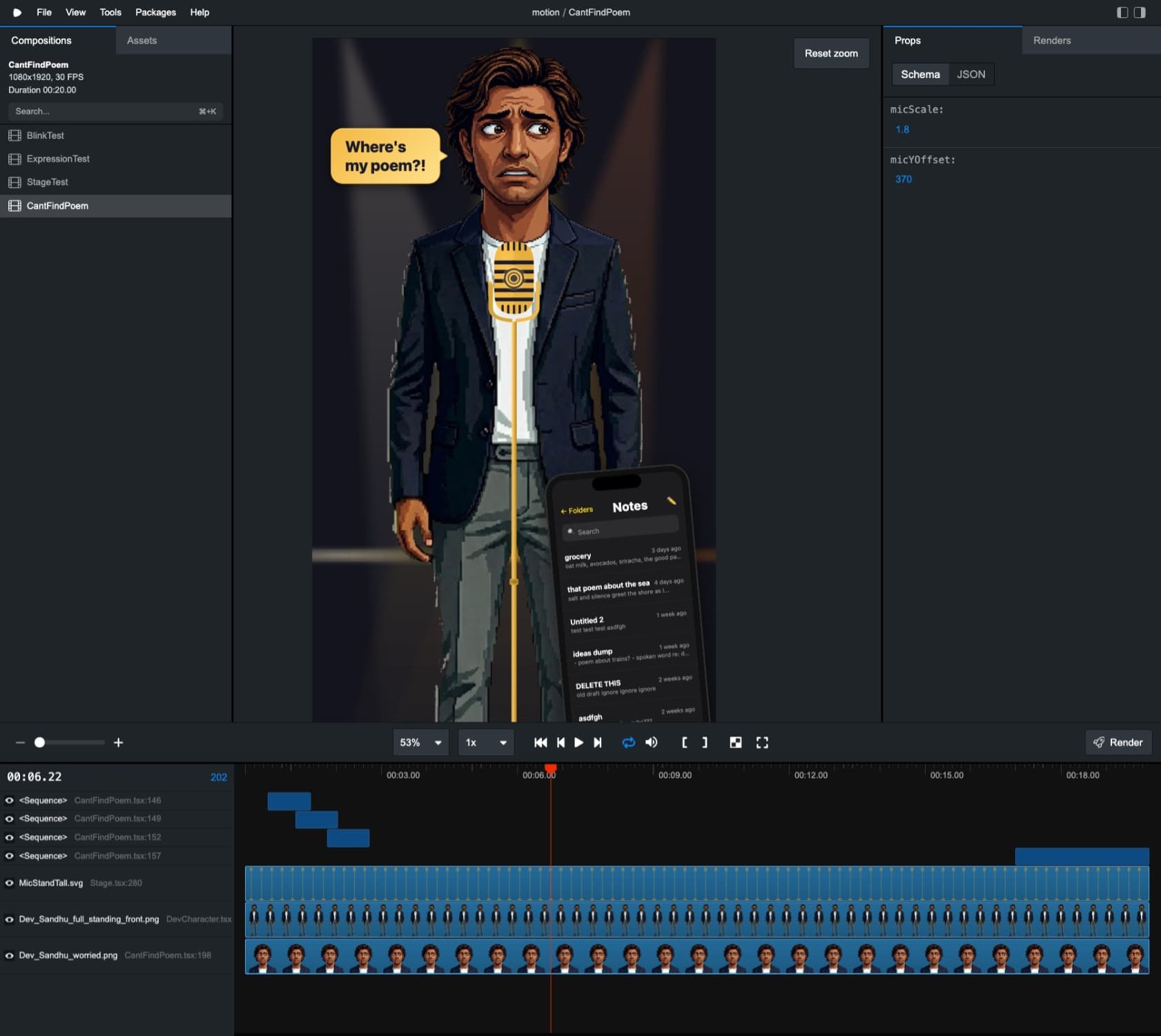
Remotion Studio. A simple composition tool that just runs in the browser. Scrub through frames, drag the Zod sliders on the right, see the result immediately.
Remotion is an open-source React framework for creating videos programmatically. Instead of dragging clips on a timeline, you write React components that render each frame.
- •Frame-level control. Every pixel, every frame is driven by code.
- •React composition. Reusable components (<Stage>, <PhoneScreen>, <DevCharacter>) that snap together like any React app.
- •Spring physics. spring() and interpolate() produce natural, eased motion without keyframe fiddling.
- •Live preview. Remotion Studio lets you scrub through the video in a browser, tweak props with Zod-powered sliders, and iterate instantly.
- •Deterministic output. The same code always produces the same video. You can put it in git and render it in CI.
Narrative Arc
| Phase | Frames | Duration | What Happens |
|---|---|---|---|
| Stage lights up | 0–90 | 3s | Three spotlights fire in sequence with SFX. Dev stands at mic. |
| Camera zooms in | 120–180 | 2s | Phone slides in from right. Camera pushes to 1.8× on Dev's face. |
| Panic | 140–270 | 4.3s | Notes app scrolls frantically. Speech bubble: "Where's my poem?!" Dev's expression shifts to worried. |
| iOS home screen | 270–320 | 1.7s | Hard cut. Home screen appears. "Ah! I've pinned it to home screen!" |
| Long-press reveal | 320–410 | 3s | Tap highlight on Spokenword widget. Tagline: "Your words, one long-press away." |
| Poem appears | 410–510 | 3.3s | Pinned poem fills phone screen with gold glow. Camera zooms back out. Dev smiles. |
| QR outro | 510–600 | 3s | Stage fades to black. QR code fades in. Crowd applause. |
The Stage lights up, Dev at the mic, phone slides in, outro fades to black. All of that is reusable. The centre section (the panic, the reveal, the punchline) is the only part that changes between scenes. Every new Spokenword feature gets its own story, but the same scaffold. That's the whole point of building this in code.
Animation Techniques
Spring camera system
A spring-animated zoom (1.0× to 1.8×) with vertical pan (0 to −420px). Push-in during panic, pull-out during resolution. Applied as CSS scale() + translateY() on the entire stage container.
Head overlay clipping
Dev's full-body sprite is clipped at the neck (clipPath: inset(627px 0 0 0)). A separate portrait expression PNG is layered on top, allowing emotion changes without swapping the entire body.
Mock Notes app
A CSS-rendered iOS Notes dark mode UI with 14 chaotic note titles ("POEM FINAL FINAL v3", "Untitled", "asdfgh") that scrolls frantically to sell the panic moment. This was a breeze to implement.
Staggered text reveals
Word-by-word reveal with 8-frame offset per line. 96px gold text with accent lines for the cinematic tagline.
Two-frame flash cuts
Black flash between content swaps (Notes → home screen → widget → poem) for snappy comedy pacing.
Zod-Powered Studio Controls
One of the trickiest parts of the build was placement and scale: where exactly the head overlay should sit relative to the full body, how far the phone should slide in, where the mic stand lands during a 1.8× camera zoom. Getting these right by editing pixel values in code and re-rendering was painfully slow.
The solution was Zod schemas registered with each Remotion composition. Zod's .min(), .max(), and .step() constraints automatically generate interactive sliders in Remotion Studio's sidebar:
export const cantFindPoemSchema = z.object({
  micScale:   z.number().min(0.5).max(3).step(0.1).default(1.8),
  micYOffset: z.number().min(-600).max(600).step(10).default(370),
});
This turned a guess-and-render cycle into a drag-and-see workflow. Scrub to the frame you care about, drag a slider, watch the element reposition in real time. The test compositions (BlinkTest, ExpressionTest) used the same technique with sliders for headLeft, headTop, headSize, and clipBottom to nail the head overlay geometry before wiring it into the main animation.
Reusing Pitch Perfect Assets
The character art was originally created for Pitch Perfect, an AI-powered Shark Tank simulator built for the Microsoft AI Dev Days 2026 hackathon. That project used the Dev Sandhu character across portrait dialogue UIs, full-body map navigation, and cutscenes. For this animation, those assets were reused directly: 61 PNGs across light and dark variants. Zero new character art needed.
| Asset Type | Count | Examples |
|---|---|---|
| Portrait expressions | 24 | worried, smile, talking, stern, excited, deflated |
| Full-body poses | 7 | standing_front, standing_left, sitting_front |
| Variants | 2 | Light (original) + Dark (stage-appropriate) |
The sprite-swap technique (switching <Img> source based on frame number) turned static portraits into expressive animation. Same trick Pitch Perfect used for cutscene emotions, just applied to a different context.
Sound Design
What I tried: AudioLDM
Tried using AudioLDM (cvssp/audioldm-s-full-v2) to batch-generate SFX locally: stage light clicks, crowd applause, screen taps, cinematic whooshes. Problem: it needs CUDA. No local NVIDIA GPU meant it was either impossible or painfully slow. And even when it worked, the results sounded synthetic. A big thumbs down from my kids.
What shipped: Adobe Express
Pivoted to Adobe Express. Took the rendered video from Remotion and added audio layers for FX and music on top. Quick to find what I needed, and the quality was right first time.
Why This Matters
Remotion moves video from a craft skill to an engineering skill. I can own the product, the code, and the marketing video that explains it. No handoff, no waiting for someone else.
Data visualisation is where this gets interesting. D3 charts have always been code, but they've always been stuck in the browser. Remotion lets you render a D3 animation straight to MP4. Real data, real motion, no screen recording. Think about what that means for financial reporting or investor updates. The chart becomes a video, and the video is generated from the data.
Same template, different data, different video. Swap one prop, re-render. An onboarding walkthrough today, a personalised summary tomorrow. The video stops being a one-off and starts being a function.
Now add an LLM. The hard part of programmatic animation was always the fiddly stuff: spring values, interpolation curves, frame offsets. I keep the creative direction. Claude handles the "nudge that 40px left and ease it differently" part. That split works surprisingly well.
Some SaaS businesses should be paying attention. There's a whole category of video creation tools that exist because making video without code was hard. That's getting less true every month. When a developer with an LLM can produce the same output and own it completely, the pitch for the subscription gets harder to make.
Tools & Stack
| Tool | Role |
|---|---|
| Remotion 4.0 | Programmatic video framework |
| Claude Code | AI pair programming for animation logic |
| React 19 | Component rendering |
| TypeScript 6 | Type safety |
| Zod 4 | Schema validation and Studio controls |
| Adobe Express | Final audio, packaging, and distribution |
| AudioLDM | Attempted SFX generation (replaced by Adobe) |
What's Next
I've got a pile of Spokenword features I want to illustrate, and this build proved it's achievable. Two scenes are already scripted. Both reuse the same Stage, DevCharacter, and PhoneScreen components. Just new stories in the middle.
Now the question is: how do I turn this into a factory?
VersionHell
“"poem final FINAL v3" naming chaos”
Feature: Clear version management with diffs
FlatDelivery
“Monotone performance, crowd falling asleep”
Feature: Per-line performance annotations
Honestly though? I'm mostly just excited about all the animation tricks I now know how to pull off with Claude and Remotion. This was the first build. The fun has just begun.